Yes – even the big boys have problem days!
How Can We Help You Today?
Yes – even the big boys have problem days!
We spent all weekend helping our customers affected by the Allscripts malware attack. A limited number of Allscripts services went down Thursday after a ransomware incident, according to an emailed statement from company spokeswoman Concetta Rasiarmos.
AllScripts allows physicians to send electronic prescriptions to pharmacies. Patient data is sent to a pharmacy for order completion – by being hacked and compromised, patient data is at risk!
New variant of SamSam – a ransomware family linked to several attacks against medical providers – is behind the Allscripts outage
The EHR giant is investigating the incident to provide further details.
“We are working diligently to restore these systems, and most importantly, to ensure our clients’ data is protected,” wrote Rasiarmos. “We regret any inconvenience caused by this temporary outage.”
In a conference call for customers on Saturday, which Salted Hash listened-in on, Allscripts’ Jeremy Maxwell, director of information security, said their PRO EHR and Electronic Prescriptions for Controlled Substances (EPCS) services were the hardest hit by the ransomware attack.
Other services had availability issues as well, but those have since been restored, such as direct messaging and some CCDA functionality.
The following email was sent to Providers:
From: NYSDOH HEALTH NOTIFICATION [mailto:notify01@health.ny.gov]
Sent: Friday, January 19, 2018 9:20 PM
To: Lisa Eng
Subject: Alert: For your immediate attention: AllScripts Cyber EventClick here when you are ready to confirm receipt of the email.
If you can not click the above link use the following URL by copying into your browser.
https://apps.health.ny.gov/pub/cgi-bin/applinks/pubforms/AlertAcknowledge2?AID=9909950yag3dqb6avType: Alert
Description of Alert: For your immediate attention: AllScripts Cyber Event
Source Organization: NYSDOH
Authorizing Person: Sally Dreslin
Sender’s Jurisdiction: state
Document Date: 01/19/2018
Date of Alert: 01/19/2018The Department of Health (DOH) is aware that a cyber incident regarding AllScripts has occurred. This may have an impact on the ability for hospitals, clinics, nursing homes, individual prescribers and pharmacies to transmit and receive prescription electronically. It is permissible for those impacted to use paper official prescriptions in accordance with New York State regulations. Should you have urgent questions in this regard, please contact DOH at (866) 811-7957 or off-hours at (866) 881-2809.
Recipients:
Dental Practices – Controlled Substance Prescription Data Reviewer (CSPDR)
Dental Practices – Controlled Substance Prescription Data Submitter (CSPDS)
Dental Practices – HPN Coordinator
Hospital (ext clinic) – Administrator
Hospital (ext clinic) – Director, Nursing
Hospital (ext clinic) – Emergency Response Coordinator
MDs as organizations – Controlled Substance Prescription Data Reviewer (CSPDR)
MDs as organizations – Controlled Substance Prescription Data Submitter (CSPDS)
MDs as organizations – HPN CoordinatorFor questions: Please send an e-mail to debra.sottolano@health.ny.gov, as notify01 is a non-monitored mailbox.
Alert – Highest priority emergency communication; warrants immediate action or attention by the recipient.
High Advisory – High priority does not warrant immediate action but recipients should be aware.
Advisory – Provides very important information for a specific incident or situation that does not require immediate action.
Updates to Alerts and Advisories – Provides updated informa tion regarding an incident or situation; unlikely to require immediate action.
Informational Message – Provides timely information, important for review or serves as a reminder for an action that should be taken.Click here when you are ready to confirm receipt of the email.
If you can not click the above link use the following URL by copying into your browser.
https://apps.health.ny.gov/pub/cgi-bin/applinks/pubforms/AlertAcknowledge2?AID=9909950yag3dqb6av
OnGuard Remote Backup platform has helped many customers over the bast few months recover from encryption ware based attacks! We offer a trusted protection platform that’s flexible enough to meet your current and future business needs. Our LIVE support works with you to help recover your systems quickly.
We are also introducing several new OnGuard security products this year geared to protect your business.
Onguard Mail Essentials powered by GFI: Protect your business against email-borne junk, viruses, spyware, phishing and other malware threats.
Hardware Firewalls with Advanced Security Protection: We are working with our U.S.A. based developers in order to provide proactive protection of your entire network, reducing your exposure to cyber threats at a price point that will not decrease your bottom lime.
A few weeks ago I explained my experiment on how I can control my spam doing nothing else but unsubscribing from emails I receive and don’t want.
Its been about 12 weeks since I began this experiment. My initial results in the first 3 weeks were amazing. I reduced my spam emails by 50%. It’s a little work to unsubscribe from some lists. If you remember, sometimes you need to unsubscribe several times, add REMOVE to your email subject, find the unsubscribe button in the email and sometimes a combination of all the above.
Now its Christmas – what better time to stop the spam emails to lists you never signed up for. and to verify our experiment. Since early October, I have intensified my unsubscribing and not allowed ANY emails I do not need to not be unsubscribed. Naturally, as I ordered items, visited web sites and performed my daily work tasks, my email will always be on another list – so i was very diligent in my immediate unsubscribing.
COMPLETE SUCCESS! – my mailbox has been reduced by 80% of junk mail. Where at nite, I would receive a few dozen emails, now I can go hours without a single unwanted email. Some experimentation with our intrusion detection software shows that attacks have been lessened, email’s with viruses loads have been reduced and our firewalls have seen a reduction in threat assessments. Therefore we can posit that the reduction in spam emails can make out network and business somewhat safer.
Therefore – unsubscribe from unwanted emails – except from us!
Unsubscribe from unwanted emails as you receive them – it will protect your network and decrease your incidences of viruses as well as clean you inbox!
Beginning on October 17th, 2017 at 10 a.m. P.T., the Windows 10 Fall Creators Update will begin rolling out to Windows 10 PCs across the world.
You don’t have to do anything to get the update; it will roll out automatically to you through Windows Update if you’ve chosen to have updates installed automatically on your device. Once the download is complete and the update is ready to install, you will be prompted to begin the installation. the update takes roughly 45 minutes or more to complete depending on your computer’s speed.
If you don’t want to wait for the update to roll out to you, you can manually check for updates on your computer using the steps below. This will only work if your device is eligible to get the Fall Creators Update. Alternatively, you can manually get the update today via the Software Download Site. This option is only recommended for advanced users on devices running a licensed version of Windows 10. If you’re using a Windows 10 PC at work, you will need to check with us for details on your organization’s specific plans to update.
[su_button url=”http://www.bulldogtechinc.com/our-story/contact-us/” target=”blank” background=”#bf1e2e” color=”#ffffff” size=”10″ wide=”yes” center=”yes” icon=”icon: arrow-down” icon_color=”#ffffff”]Contact Us[/su_button]
Ways to get the Windows 10 Fall Creators Update
1. To manually find out if your device is part of the first phase rollout, check for updates on the Windows Update settings page.
In the Search tab, type “Settings”. On the Settings page, navigate to Update & security > Windows Update
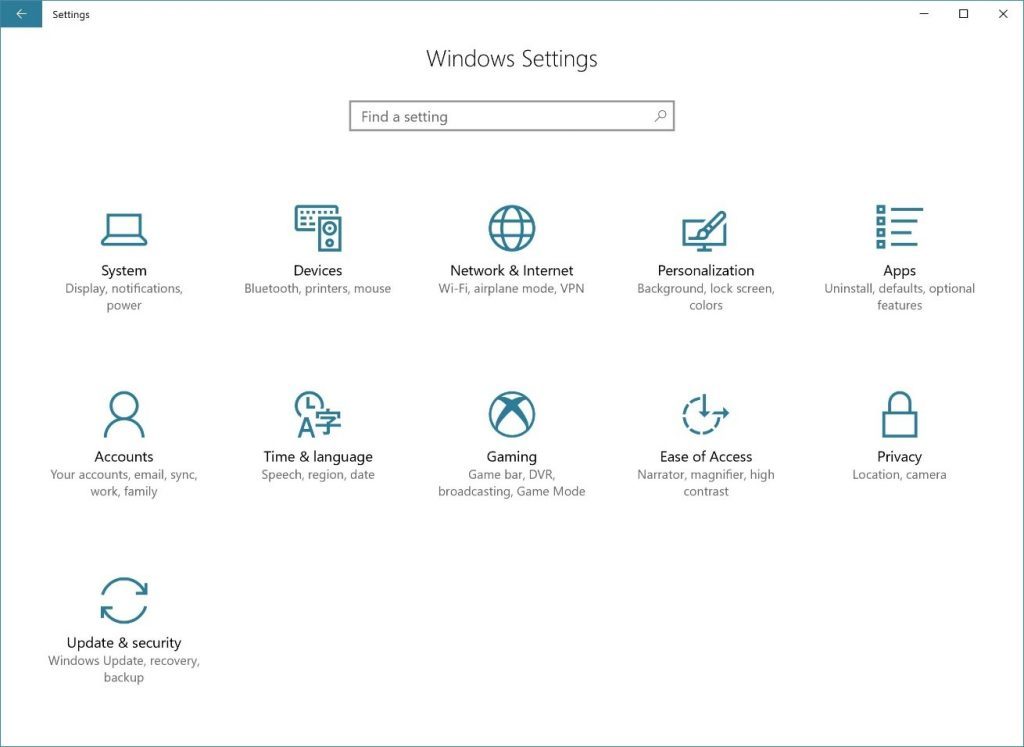
On the Windows Update page, simply click Check for updates. This will also check if your device is up to date with the latest monthly security updates.
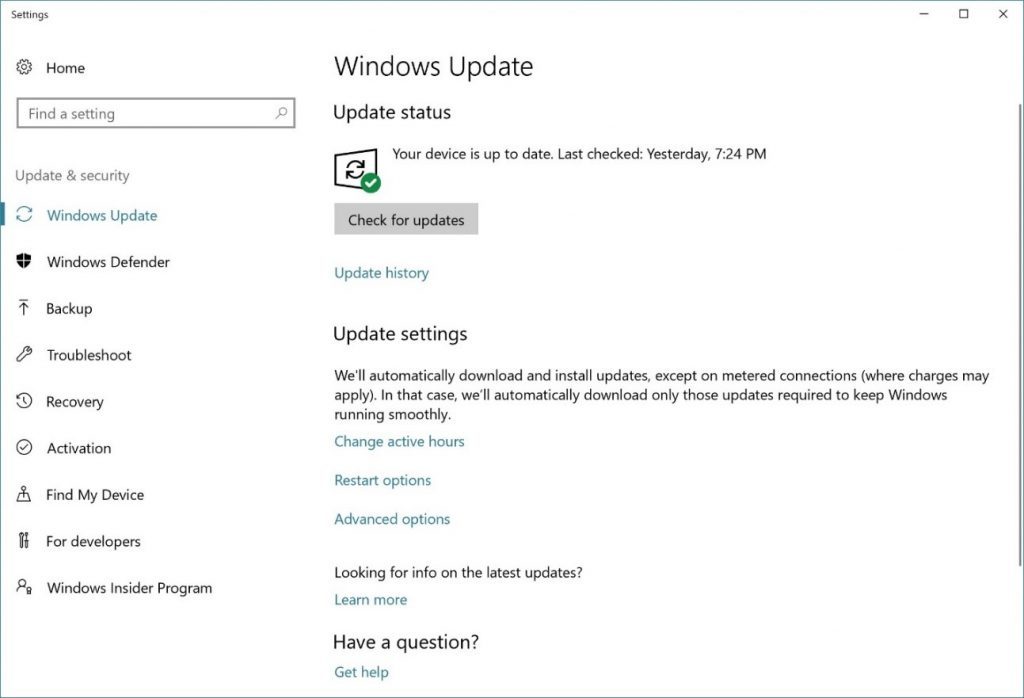
If your device is part of the first phase of roll out, the feature update may begin downloading immediately to your PC. You can still use your PC as you normally would while the update downloads in the background.
Once the download is complete you’ll be prompted to select the best time to complete installation so as not to disrupt what you are doing.
If the update doesn’t begin downloading after you click “Check for Updates” on the Windows Update page, you’ll see a message stating “Your device is up to date.” This means your device has all the updates available for it based on your device’s eligibility at this time. At this point we recommend waiting until the Fall Creators Update is rolled out to your device automatically.
2. Manually update for advanced users
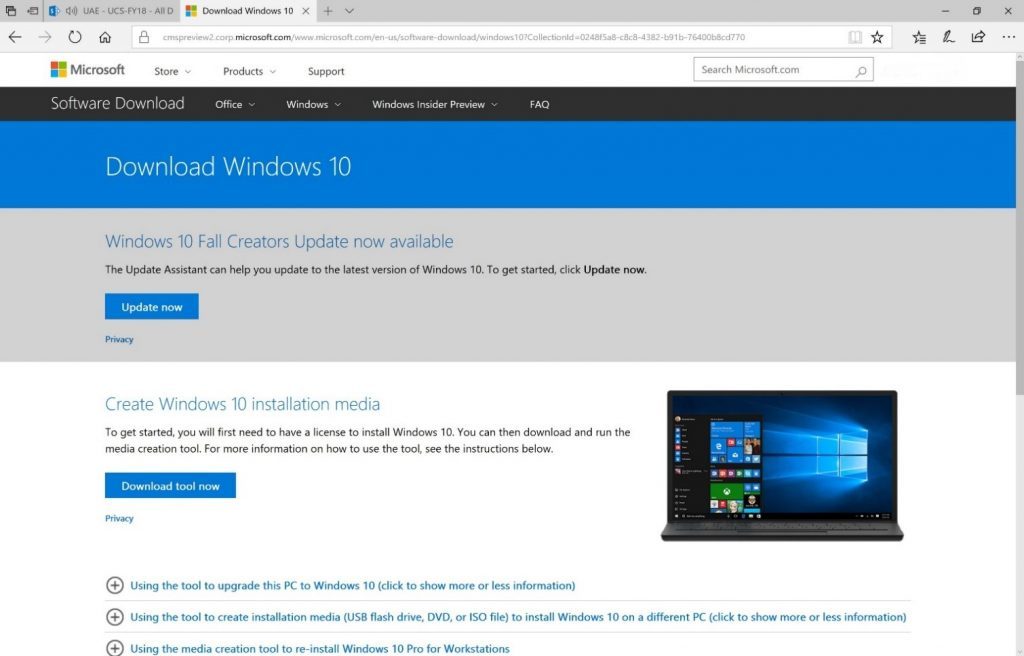
As an advanced user, you have two manual installation options. The recommended method is to utilize the Update Assistant. To do so, click the Update Now button on the Software Download Site. You’ll need a licensed version of Windows 10 to use this method to get the feature update. Alternatively, you can download and run the Media Creation Tool on the same site, which will help you perform a clean installation or reinstall of Windows 10.
We hope you enjoy the Windows 10 Fall Creators Update and the many new features it brings. Click here to learn about all the new features in the Windows 10 Fall Creators Update. If you have feedback about your experience, please use the Feedback Hub app to share it with us. We’ll share more on how we roll out the Fall Creators Update shortly!
So far, we noticed the following issues occuring after an upgrade. We will update this list as more are discovered:
Hyatt Hotels said Thursday it discovered unauthorized access to payment card information at certain Hyatt-managed locations worldwide between March 18 and July 2.
Hyatt said the incident affected payment card information, such as, cardholder name, card number, expiration date and internal verification code, from cards manually entered or swiped at the front desk of certain Hyatt-managed locations.
The owner of Andaz, Park Hyatt and Grand Hyatt chain of hotels said a total of 41 properties were affected in 11 countries, with China accounting for 18 properties, the most among impacted countries.
Seven Hyatt properties were affected at U.S. locations, including three in Hawaii, three in Puerto Rico and one in Guam.
The Chicago, Illinois-based company said its cyber security team discovered signs of the unauthorized access in July and launched an internal investigation, completed on Thursday, that resolved the issue and took steps to prevent this from happening in the future.
This is not the first time Hyatt is facing data breach problem at its hotels.
In late 2015 Hyatt said its payment processing system was infected with credit-card-stealing malware, that had affected 250 hotels in about 50 countries.