FBI paid Geek Squad staff to be informants, documents show

Posted on
bulldog tech privacy

The agency’s relationship with staff in the Best Buy repair unit goes back at least a decade, say documents obtained by the Electronic Frontier Foundation.

by Steven Musil, CNET. Published March 6, 2018 5:16 PM PST

Read at CNET

FBI agents paid employees in Best Buy’s Geek Squad unit to act as informants, documents published Tuesday reveal.

Agents paid managers in the retailer’s device repair unit to pass along information about illegal content discovered on customers’ devices, according to documents posted online by the Electronic Frontier Foundation. The digital rights group sued the FBI for the documents last year after the bureau denied a Freedom of Information Act request.

The EFF filed the lawsuit to learn the extent to which the agency trains and directs Best Buy Geek Squad employees to conduct warrantless searches of customers’ devices during maintenance. The EFF said it was concerned that use of repair technicians to root out evidence of criminal behavior circumvents people’s constitutional rights.

What the EFF found was that the agency’s relationship with Geek Squad employees goes back at least a decade. An FBI memo from 2008 describes a meeting between Best Buy employees and the agency’s “Cyber Working Group” at the company’s Kentucky repair facility.

The memo describes how Best Buy employees gave agents a tour of the facility and went on to say the bureau’s Louisville Division “has maintained close liaison with the Geek Squad’s management in an effort to glean case initiations and to support the division’s Computer Intrusion and Cyber Crime programs.”

Another document shows the FBI approved a $500 payment to a “confidential human source” whose name was redacted. The EFF said the payment appears to be one of many connected to the prosecution of Mark Rettenmaier, a Southern California doctor accused of possessing child pornography after he sent in his computer to Best Buy for repairs.

The EFF said the documents detail investigation procedures in which Geek Squad employees would contact the FBI after finding what they believed to be child pornography on a customer’s device.

The EFF said an FBI agent would examine the device to determine whether there was illegal content present, and if so, seize the device and send it to the FBI field office closest to where the customer lived. Agents would then investigate further, and in some cases try to obtain a warrant to search the device.

Best Buy said last year that three of the four employees who may have received payment from the FBI are no longer employed by the company. The fourth was reprimanded and reassigned.

Best Buy didn’t immediately respond to a request for comment but told CNET sister site ZDNet that Geek Squad employees inadvertently discover suspected child pornography on customers’ computers nearly 100 times a year.

“We have a moral and, in more than 20 states, a legal obligation to report these findings to law enforcement,” Best Buy said in a statement. “We share this policy with our customers in writing before we begin any repair.

“As a company, we have not sought or received training from law enforcement in how to search for child pornography. Our policies prohibit employees from doing anything other than what is necessary to solve the customer’s problem. In the wake of these allegations, we have redoubled our efforts to train employees on what to do — and not do — in these circumstances.”

The FBI declined to comment, saying it doesn’t provide information on its dealings with informants.

Need Help? Call us Today

718-921-6159

AOL Mail Is Dead Today

Posted on

Update: AOL reporting issue has been resolved!

While we are not affiliated with AOL, or the outage in general, we’ll keep you posted as to when they fix the issue.

We’ve received numerous calls and emails today to our support line where customers could not reach AOL Mail. For the past several hours AOL has been down and some delivery problems have been noted. While AOL works to correct this, expect continued interruptions and timeouts.

These outages can happen time to time with free services. A hosted email solution is the most reliable way to ensure you always have access to your emails. These free accounts are not reliable, secure, spread viruses and are hacked on an almost daily basis.

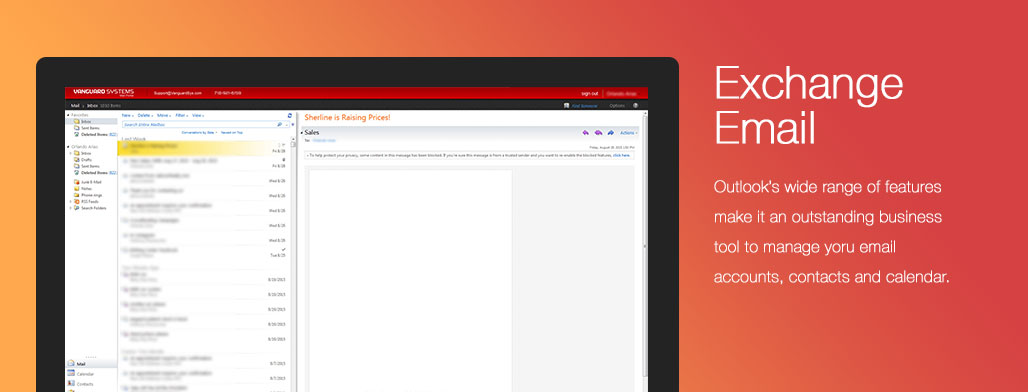
Our Hosted Microsoft Exchange Emails gives you the power, flexibility & productivity you demand in business critical email system. Bulldog Tech offers affordable, convenient and secure email packages.

Looking to ditch AOL? Give us a call.

Can’t type in Windows 10 search bar or any other screen except IE

Posted on

We had a few issues where client could not type into the search bar in Cortana, skype or other apps BUT could use Edge and IE. This baffled us for a while as we changed keyboards & reloaded machines all to no avail.

After some research, we discovered that a bad windows update or a program installed can damage some files. Here is what we use to fix these issues:

If any of these functions like Start Menu, Settings, Search, Cortana, Microsoft Edge, Action Center and other Windows components are not responding, follow these below methods and check if it helps: 

Method 1:

  • Press Windows + X keys on the keyboard, select Command prompt (admin).
  • Enter the below commands one by one and hit Enter key.

    PowerShell -ExecutionPolicy Unrestricted

  • It will open the PowerShell window.
  • Now enter the below command and hit Enter key.

    Get-AppXPackage -AllUsers |Where-Object {$_.InstallLocation -like “*SystemApps*”} | Foreach {Add-AppxPackage -DisableDevelopmentMode -Register “$($_.InstallLocation)\AppXManifest.xml”}

If the issue still persist, follow the below method.

Method 2:

  • Open the Task manager.  Here’s a tip:  Press CTRL+Shift+ESC.
  • Click File > Run New Task
  • Make sure you have a check mark beside “Create this task with administrative privileges”
  • Type Powershell
  • Type the following in the Powershell prompt:
    $manifest = (Get-AppxPackage Microsoft.WindowsStore).InstallLocation + ‘\AppxManifest.xml’ ; Add-AppxPackage -DisableDevelopmentMode -Register $manifest
  • Close the Powershell window
  • Reboot the computer and check if it helps.

Turn off Windows Programs on Startup

Posted on

When loading applications, they sometimes load parts of the program every time you start windows – these apps can slow your machine down when running applications, make startup very slow and at times cause ads to appear.

Its easy to turn off such apps and speed up your computer:

Windows 10

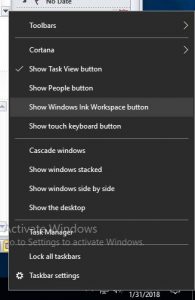
  1. Right click anywhere on the TASK bar at the bottom of the screen
  2. LEFT click on the TASK MANAGER Menu Item
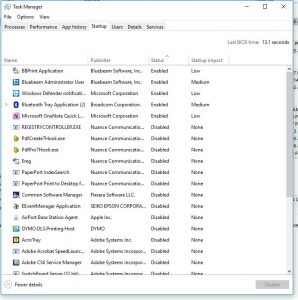
  3. Click the STARTUP Tab – if you do not see the startup tab, on the bottom click MORE DETAILS to show
  4. Select each program you do not want to run and click the DISABLE button – – in our many years experience, you can uncheck ALL except antivirus.
Right Click on Task bar and select TASK MANAGER


Select Each App you want removed and press DISABLE


Windows up to 8

  1. Click START
  2. CLICK RUN
  3. Type: MSCONFIG and press ENTER
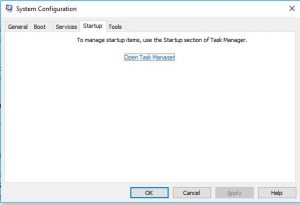
  4. Click on the tab STARTUP
  5. You will see multiple programs – you can UNCHECK each app you do not want to run – in our many years experience, you can uncheck ALL except antivirus.