Ransome Ware Virus ALERT!!!!!!!!!!!

Posted on

PROTECT YOUR BUSINESS FROM RANSOMEWARE – Some Facts and best practices!

The news broke on Friday of a massive ransomware attack on the UK NHS and the attack has now impacted up to 200,000 organizations in 150 countries. As such, we have received many emails and phone calls asking if “we are protected” and “what can we do to prevent an attack” since the news broke. Well, the reality is that you CANT prevent the attack from TRYING to occur and if you are unlucky enough to be attacked and compromised, there is not much you can do to recover your data UNLESS you have good backups.

Let me explain this in simpler terms: MOST security measures are reactive – not proactive. Think of getting a flu shot – this prevents KNOWN diseases from attacking you (in most people) it does not mean you will never get sick or that a new strain will infect you. Its an ounce of prevention but no guarantee. The attack vector USUALLY is an email you open or a web site you visit. Just reading the email can instantly infect your systems. The attack is invasive and will search out your servers and other systems thereby locking ALL you data – hence why we DO NOT recommend locally connected hard drives for backup – we have seen too many times after we remove the infection the systems be re-infected by these devices.

Now back to your protections, most of us will not spend the money to change our routers and firewalls to “better” units. Think right now would you:

A. Spend $1500 for a new router that will not prevent an attack but provide better protection? If you say YES than i will make sure you have piece of mind – I have them in stock now and have installed them in a few customers already.

B. Will you spend $50 more month for for a “better” antivirus” that’s managed  and provides additional protections?

I strongly suggest you think about these 2 options if you business data is critical.

Steps you can take to mitigate ransom where attacks:

1. DO NOT USE AOL, Yahoo, Gmail or any other free mail service – We cannot stress this enough – those services are hacked regularly and are not secured. They are not business services – Call us and we can switch you over to our secured Microsoft Exchange Emails
2. Do not allow employees to read their personal emails using the above services on your business systems
3. DELETE ANY email you are not sure of
4. Delete Any Email you are not sure of
5. Did I mention to delete ANY email you are not sure of?
6. NEVER open attachments from emails you are unsure of – DELETE Immediately
7. Avoid social media on work computers
8. Remove all external backup drives from systems
9. Remove all weather software and any other non-business software from user stations
10. MAKE SURE YOU HAVE REMOTE BACKUP SERVICES – We have saved many businesses from total disaster with our service – it may take 2 days to retrieve all your data – BUT you HAVE all your data!
11. Update your firewall/Routers – remove all cisco/linksys routers/firewalls and allow us to install more secure systems
12. Change to our managed antivirus
13. Migrate all your emails to our secure Microsoft Email servers

In effect this comes down to training and enforcement of specific policies for you and your employees.

Nothing is 100%, no one is immune – but by judiciously applying resources in upgrades and training, you can harden your systems and continue doing business!

I have included an attachment for my Ransomware hostage rescue manual – give it a quick read.

Contact us anytime to discuss and we can provide you with suggestions to securing your business.
Ransom.CryptXXX (WannaCry) Ransomware Attack – Patch Immediately

Posted on

Users of Windows need to be notified ASAP of a new ransomware strain and take immediate measures to patch.

Specifically, on May 12, 2017 a new strain of the Ransom.CryptXXX (WannaCry) strain of ransomware began spreading widely impacting a large number of organizations, particularly in Europe.

Wcry is demanding a ransom of $300 to $600 in Bitcoin to be paid by May 15, or, in the event that deadline is missed, a higher fee by May 19. The messages left on the screen say files will remain encrypted. It’s not yet clear if there are flaws in the encryption scheme that might allow the victims to restore the files without paying the ransom.

If you have yet to install the Microsoft fix—MS17-010— you should do so immediately. You should also be extremely suspicious of all e-mails you receive, particularly those that ask the recipient to open attached documents or click on Web links.

If you have seen nonstandard activity and believe your customers’ information may have been exposed, please contact support.

WARNING – Firefox Update NOT compatible with many web sites & camera systems

Posted on
firefox ESR

Firefox has released an update to Ver 52 which has been causing many headaches. We have received many calls from customers stating web sites stop functioning or they have lost access to their cameras and/or they cannot install their Firefox plugins/addons.

We also were effected with similar issues. Only after many hours of trying to understand and repair this, we realized that the issues centered around Firefox’s latest update. Firefox is aware of this and has released an ESR (Extended Support Release) to rollback their changes for a time (yes eventually this fix will also not work). We have used this fix and it does not seem to effect bookmarks or other settings. Eventually, all addons and plugins will have to be upgraded and we are at the mercy of the respective manufacturers – hence when this ESR expires we either can no longer use firefox or we hope our manufacturers update their plugins and web sites – I an not confident about older camera systems being supported at this time.

If you experience ANY issues using firefox such as:

  • You can no longer access your camera systems
  • Web sites ask for plugins
  • PDF viewer stops working
  • Add-Ons in Firefox is empty

You need to do the following:

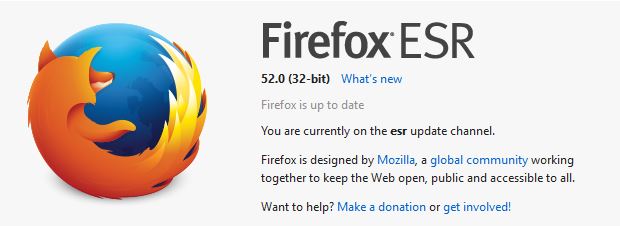
  1. Check your version of Firefox – Click on the top menu HELP – About Firefox. If you have Ver 52 Continue to the next steps
  2. Click here to download the FIREFOX 5.2 ESR I have this link going right to the English Version simply select the proper 32 or 64 bit – again you can tell which you have by the HELP button
  3. Goto your DOWNLOADS folder and RUN the fire fox update – usually named: FIREFOX SETUP 52.0esr.exe. This will usually be located in your DOWNLOADS folder.
  4. Continue with the STANDARD install of this update
  5. Once completed restart firefox

This should bring back your system to before the update – check your websites and camera systems.

If you experience any other issues, please contact us for help.


Preventing Good Emails from Going into your Spam Folder

Posted on

Do you find that Outlook is incorrectly sending legitimate emails to your junk mail folder? Here are a few tips to help your junk mail filter work properly.

These tips are based on the Safe Senders List. The Safe Senders list is basically a list of email addresses (or domains) that you say should NOT be treated as junk.

Change Settings to trust emails in your Contacts list and to trust people who you have sent emails to

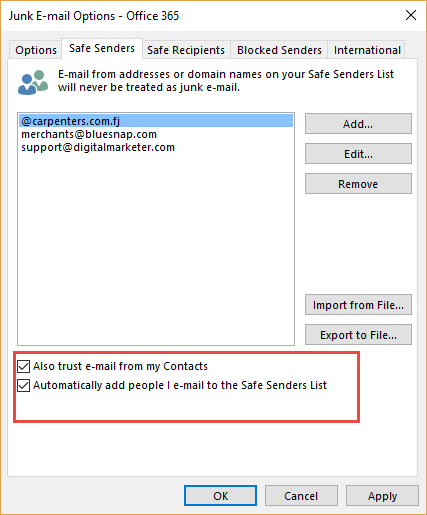
The first thing you need to do is to tell Outlook to trust email addresses that are in your Contact list. You can also tell Outlook to add people to your Safe Senders list anytime you send them an email (even if they are not in your contact list)

    1. Right click over any email in your Inbox.
    2. Click Junk and then Junk E-mail Options.
    3. Click on the Safe Senders tab.

signature

  1. Tick the checkbox to “trust emails from my Contacts”.
  2. Tick the checkbox to “automatically add people I email to the Safe Senders List”.

Add people who end up in the Junk Mail folder to the Safe Senders List.

You will still find that some legitimate emails may end up in the Junk Emails folders. Here’s what you need to do to add them to the Safe Senders list.

    1. Go to your Junk Email folder.
    2. Right click over the email.
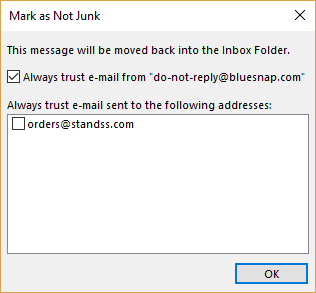
    3. Click Junk and then click Not Junk.

signature

  1. Make sure that the “Always trust….” checkbox is ticked.
  2. Click OK.

The senders email address will be added to the Safe Senders list and the email will be moved to your Inbox too.