On March 10th Microsoft has introduced a new Windows update, which is currently not compatible with our newest DYMO Connect and DYMO Label v.8.7.3 software. Our developers are currently working on a permanent solution in association with Windows specialists.
At the moment, there are two solutions that can help solve the issue of printing blank labels.
Solution 1 (recommended): Uninstalling the latest Windows update.
In order to uninstall the latest Windows update, please follow the steps below:
Please check what version of Windows you have.
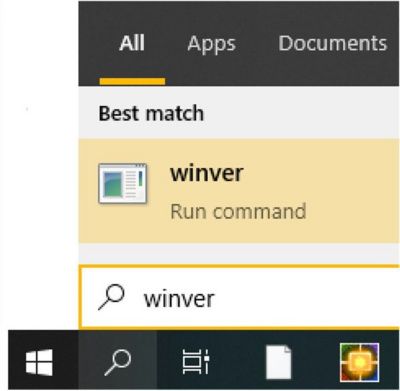
Please click on Windows logo (bottom left corner) and type “winver”.
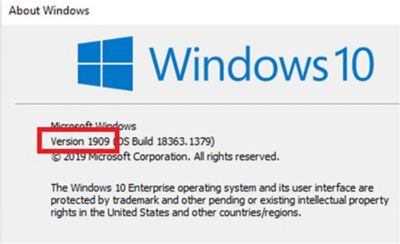
Here you can see version of your Windows (example: “Version 1909”).
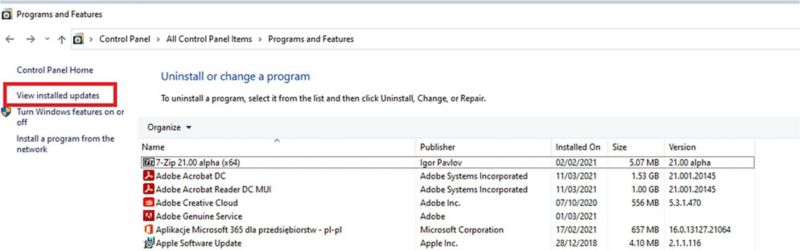
Please go to Control Panel > All Control Panel Items > Programs and Features Click on the “View installed updates”
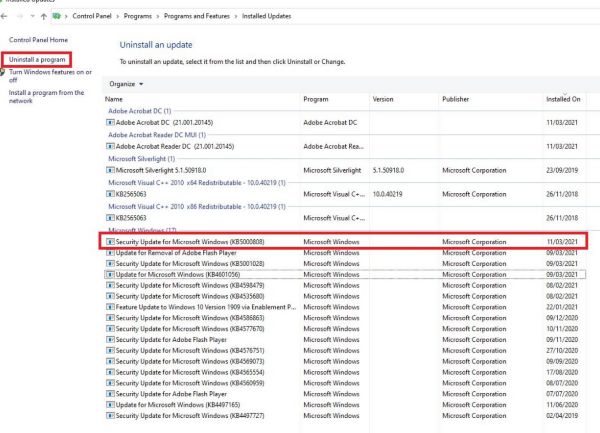
Remove Windows updates that are corresponding to your Windows version, see below:
For Windows 10 version 1909 – remove -> (KB5000808)
For Windows 10 version 2004 – remove -> (KB5000802)
For Windows 10 version 20H2 – remove -> (KB5000802)
For Windows 10 version 1809 – remove -> (KB5000822)
For Windows 8.1 – remove -> (KB5000848 and KB5000853)
For Windows 7 SP1 – remove -> (KB5000841 and KB5000851)
Select the appropriate file, corresponding to your Windows version and uninstall the program.
Restart your computer.
Solution 2: Downloading and installing our DYMO Label Software v.8.5.4.
You can install the older version of DYMO Label Software to be able to use your DYMO printer.
Important note about the version 8.5.4:
It is not compatible with the LabelWriter Wireless printer. In case you have LabelWriter Wireless, please see Solution 1 above.
You will not be able to open your saved labels created in the latest DYMO software versions.
Make a copy of labels saved in ‘Documents’ folder in order to use them when the issue is resolved.
The Address Fixer tool (US only) will not work.
Please follow the steps below:
Go to Control Panel > Programs > Programs and Features, right-click on DYMO Label Software or DYMO Connect Software > Select uninstall.
Use the following link to download and install the previous version of the software:
Microsoft has detected multiple 0-day exploits being used to attack on-premises versions of Microsoft Exchange Server in limited and targeted attacks. In the attacks observed, the threat actor used these vulnerabilities to access on-premises Exchange servers which enabled access to email accounts, and allowed installation of additional malware to facilitate long-term access to victim environments. Microsoft Threat Intelligence Center (MSTIC) attributes this campaign with high confidence to HAFNIUM, a group assessed to be state-sponsored and operating out of China, based on observed victimology, tactics and procedures.
We are sharing this information with our customers and the security community to emphasize the critical nature of these vulnerabilities and the importance of patching all affected systems immediately to protect against these exploits and prevent future abuse across the ecosystem. This blog also continues our mission to shine a light on malicious actors and elevate awareness of the sophisticated tactics and techniques used to target our customers. The related IOCs, Azure Sentinel advanced hunting queries, and Microsoft Defender for Endpoint product detections and queries shared in this blog will help SOCs proactively hunt for related activity in their environments and elevate any alerts for remediation.
Microsoft would like to thank our industry colleagues at Volexity and Dubex for reporting different parts of the attack chain and their collaboration in the investigation. Volexity has also published a blog post with their analysis. It is this level of proactive communication and intelligence sharing that allows the community to come together to get ahead of attacks before they spread and improve security for all.
Who is HAFNIUM?
HAFNIUM primarily targets entities in the United States across a number of industry sectors, including infectious disease researchers, law firms, higher education institutions, defense contractors, policy think tanks, and NGOs.
HAFNIUM has previously compromised victims by exploiting vulnerabilities in internet-facing servers, and has used legitimate open-source frameworks, like Covenant, for command and control. Once they’ve gained access to a victim network, HAFNIUM typically exfiltrates data to file sharing sites like MEGA.
In campaigns unrelated to these vulnerabilities, Microsoft has observed HAFNIUM interacting with victim Office 365 tenants. While they are often unsuccessful in compromising customer accounts, this reconnaissance activity helps the adversary identify more details about their targets’ environments.
HAFNIUM operates primarily from leased virtual private servers (VPS) in the United States.
Technical details
Microsoft is providing the following details to help our customers understand the techniques used by HAFNIUM to exploit these vulnerabilities and enable more effective defense against any future attacks against unpatched systems.
CVE-2021-26855 is a server-side request forgery (SSRF) vulnerability in Exchange which allowed the attacker to send arbitrary HTTP requests and authenticate as the Exchange server.
CVE-2021-26857 is an insecure deserialization vulnerability in the Unified Messaging service. Insecure deserialization is where untrusted user-controllable data is deserialized by a program. Exploiting this vulnerability gave HAFNIUM the ability to run code as SYSTEM on the Exchange server. This requires administrator permission or another vulnerability to exploit.
CVE-2021-26858 is a post-authentication arbitrary file write vulnerability in Exchange. If HAFNIUM could authenticate with the Exchange server then they could use this vulnerability to write a file to any path on the server. They could authenticate by exploiting the CVE-2021-26855 SSRF vulnerability or by compromising a legitimate admin’s credentials.
CVE-2021-27065 is a post-authentication arbitrary file write vulnerability in Exchange. If HAFNIUM could authenticate with the Exchange server then they could use this vulnerability to write a file to any path on the server. They could authenticate by exploiting the CVE-2021-26855 SSRF vulnerability or by compromising a legitimate admin’s credentials.
Attack details
After exploiting these vulnerabilities to gain initial access, HAFNIUM operators deployed web shells on the compromised server. Web shells potentially allow attackers to steal data and perform additional malicious actions that lead to further compromise. One example of a web shell deployed by HAFNIUM, written in ASP, is below:
Following web shell deployment, HAFNIUM operators performed the following post-exploitation activity:
Using Procdump to dump the LSASS process memory:
Using 7-Zip to compress stolen data into ZIP files for exfiltration:
Adding and using Exchange PowerShell snap-ins to export mailbox data:
Using the Nishang Invoke-PowerShellTcpOneLine reverse shell:
Downloading PowerCat from GitHub, then using it to open a connection to a remote server:
HAFNIUM operators were also able to download the Exchange offline address book from compromised systems, which contains information about an organization and its users.
Can I determine if I have been compromised by this activity?
The below sections provide indicators of compromise (IOCs), detection guidance, and advanced hunting queries to help customers investigate this activity using Exchange server logs, Azure Sentinel, Microsoft Defender for Endpoint, and Microsoft 365 Defender. We encourage our customers to conduct investigations and implement proactive detections to identify possible prior campaigns and prevent future campaigns that may target their systems.
Check patch levels of Exchange Server
The Microsoft Exchange Server team has published a blog post on these new Security Updates providing a script to get a quick inventory of the patch-level status of on-premises Exchange servers and answer some basic questions around installation of these patches.
Scan Exchange log files for indicators of compromise
CVE-2021-26855 exploitation can be detected via the following Exchange HttpProxy logs:
These logs are located in the following directory: %PROGRAMFILES%\Microsoft\Exchange Server\V15\Logging\HttpProxy
Exploitation can be identified by searching for log entries where the AuthenticatedUser is empty and the AnchorMailbox contains the pattern of ServerInfo~*/*
Here is an example PowerShell command to find these log entries:
If activity is detected, the logs specific to the application specified in the AnchorMailbox path can be used to help determine what actions were taken.
These logs are located in the %PROGRAMFILES%\Microsoft\Exchange Server\V15\Logging directory.
CVE-2021-26858 exploitation can be detected via the Exchange log files:
Many of the following detections are for post-breach techniques used by HAFNIUM. So while these help detect some of the specific current attacks that Microsoft has observed it remains very important to apply the recently released updates for CVE-2021-26855, CVE-2021-26857, CVE-2021-27065 and CVE-2021-26858.
Microsoft Defender Antivirus detections
Please note that some of these detections are generic detections and not unique to this campaign or these exploits.
To locate possible exploitation activity related to the contents of this blog, you can run the following advanced hunting queries via Microsoft Defender for Endpoint and Azure Sentinel:
Microsoft Defender for Endpoint advanced hunting queries
Additional queries and information are available via Threat Analytics portal for Microsoft Defender customers.
UMWorkerProcess.exe in Exchange creating abnormal content
Look for Microsoft Exchange Server’s Unified Messaging service creating non-standard content on disk, which could indicate web shells or other malicious content, suggesting exploitation of CVE-2021-26858 vulnerability:
DeviceFileEvents | where InitiatingProcessFileName == "UMWorkerProcess.exe" | where FileName != "CacheCleanup.bin" | where FileName !endswith ".txt"
| where FileName !endswith ".LOG" | where FileName !endswith ".cfg" | where FileName != "cleanup.bin"
UMWorkerProcess.exe spawning
Look for Microsoft Exchange Server’s Unified Messaging service spawning abnormal subprocesses, suggesting exploitation of CVE-2021-26857 vulnerability:
DeviceProcessEvents
| where InitiatingProcessFileName == "UMWorkerProcess.exe" | where FileName != "wermgr.exe" | where FileName != "WerFault.exe"
Please note excessive spawning of wermgr.exe and WerFault.exe could be an indicator of compromise due to the service crashing during deserialization.
Look for Nishang Invoke-PowerShellTcpOneLine in Windows Event Logging:
SecurityEvent | where EventID == 4688 | where Process has_any ("powershell.exe", "PowerShell_ISE.exe") | where CommandLine has "$client = New-Object System.Net.Sockets.TCPClient"
Look for downloads of PowerCat in cmd and Powershell command line logging in Windows Event Logs:
SecurityEvent | where EventID == 4688 | where Process has_any ("cmd.exe", "powershell.exe", "PowerShell_ISE.exe") | where CommandLine has "https://raw.githubusercontent.com/besimorhino/powercat/master/powercat.ps1"
Look for Exchange PowerShell Snapin being loaded. This can be used to export mailbox data, subsequent command lines should be inspected to verify usage:
SecurityEvent | where EventID == 4688 | where Process has_any ("cmd.exe", "powershell.exe", "PowerShell_ISE.exe") | where isnotempty(CommandLine) | where CommandLine contains "Add-PSSnapin Microsoft.Exchange.Powershell.Snapin" | summarize FirstSeen = min(TimeGenerated), LastSeen = max(TimeGenerated) by Computer, Account, CommandLine
People are reporting issues using major websites on Tuesday, and it appears to be related to outages impacting Verizon’s Fios service.
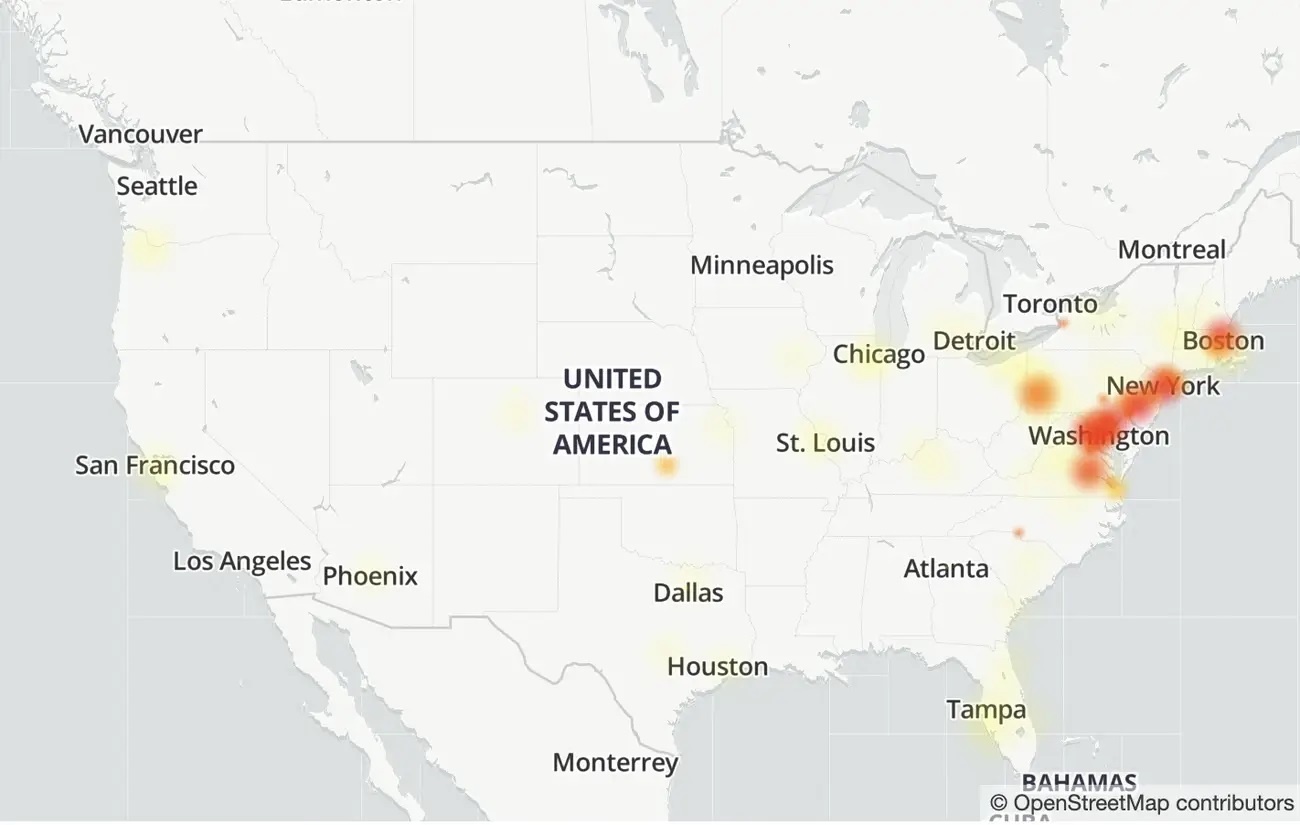
A spokesperson for Verizon, which had more than 2,000 reports on DownDetector, told Insider it was looking into the reports. Verizon’s support account on Twitter wrote that “There is a fiber cut in Brooklyn. We have no ETR, as of yet” and directed impacted users to use the My Fios app for updates.
Verizon Fios customers along the East Coast took to social media to report issues with their service.
The number of issue reports on outage-tracking website Down Detector spiked on Tuesday for websites including Zoom, Gmail, Spotify, Slack , and Amazon’s Web Services, among others, but many have told Insider their services were working on their end.
Amazon, whose Amazon Web Services helps power services like Zoom and Slack, said it was “investigating connectivity issues with an internet provider, mainly affecting the East Coast of the United States, outside of the AWS Network. We are investigating the issue with the external provider.”
Later on, the company further clarified that between 11:26 a.m. 12:46 p.m. ET, some East Coast AWS customers experienced connectivity issues. “Connectivity to instances and services within the Region were not impacted by the event. Internet traffic to/from other external providers was also not impacted. All AWS services continue to operate normally.”
Before noon ET, DownDetector showed more than 1,200 people reporting problems with Amazon Web Services, but the number of problems has since tapered off. An Amazon spokesperson told Insider the company did not see any issues on its end with the cloud service.
Zoom and Google had more than 4,000 user complaints on Down Detector Tuesday morning, but did not immediately respond to a request for comment. Slack and Spotify issue reports also spiked, but Slack told Insider in a statement that its service was “currently up and running” and Spotify said that “All seems to be normal on our end at present.”
On the first day of the new year, Slack was down, and in November last year, sites using Amazon Web Services experienced a massive outage.
Even the big boys occasionally suffer failures. Technologies of this scale can have issues.
We are aware of technical issues related to Amazon Web Services and impacting some sellers’ ability to access some or all of Seller Central and Marketplace Web Services (MWS) APIs, and we are working to resolve them. This does not impact customers’ ability to place orders.
As we work on a solution, you may start seeing new orders in Manage Your Orders or via the MWS Orders APIs.
We (AMAZON) are writing to inform you of a technical issue affecting your Amazon Payments merchant account. On 11/25/2020, 9:52 AM PST, AWS reported an issue with reduced availability, which is impacting Amazon Pay services.
Specifically, orders are not available in Seller Central for merchant visibility or within pay.amazon.com for buyer visibility. Please note that there is no impact to Amazon Pay processing at this time. Buyers will be able to checkout without issue.
We are working to resolve the problem in displaying completed orders in Seller Central. No further action on your part is required at this time.